
Scheduling
Scheduling
Whiteboards vs Live Schedules: What Production Teams Actually Need
Whiteboards vs Live Schedules: What Production Teams Actually Need
Whiteboards vs Live Schedules: What Production Teams Actually Need

By
By
By
Matthew Quigley
Matthew Quigley
Matthew Quigley
All field notes
All field notes

Whiteboards vs Live Schedules: What Production Teams Actually Need
At a glance
The fix isn't ripping out the whiteboard's logic. It's giving the shop that same visibility, connected to live job data.
Most production teams like their whiteboard for a good reason. Anyone can walk past and understand the plan, at least roughly. For a small fabrication shop, that simplicity is hard to beat.
The problem isn't the whiteboard. The problem is what happens when the whiteboard becomes the production system.
As the shop grows, the board has to carry too much: which jobs are due, which machines are free, which materials have landed, who's running what, what's changed since this morning, what's waiting on an outside process, and which customer is chasing an answer. That's more than a static board can hold reliably.
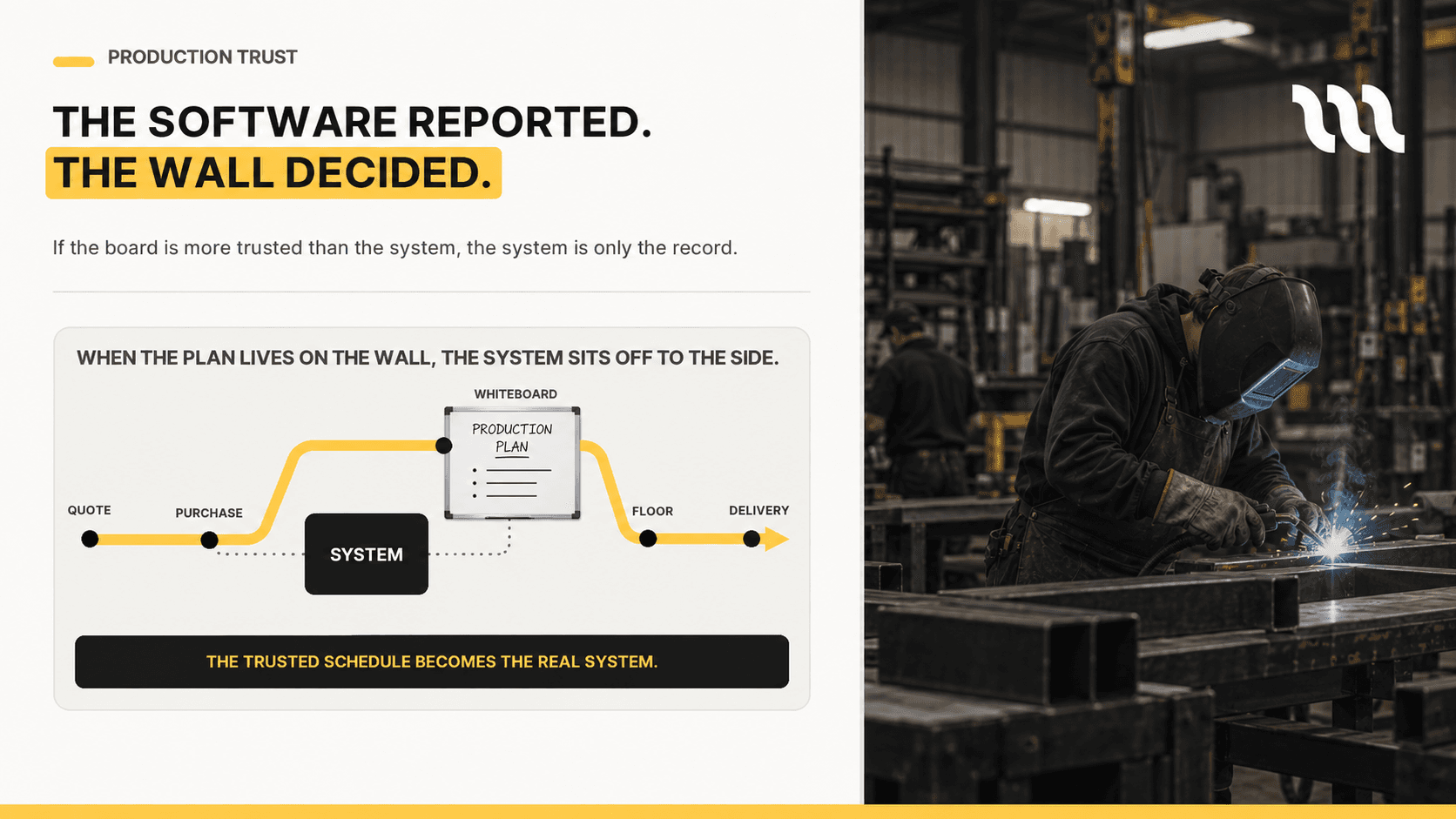
A whiteboard can show what the team planned. It can't maintain a live production schedule.
A whiteboard is useful because everyone can see it. It becomes dangerous when everyone assumes it's still accurate.
Why whiteboards survive in job shops
Whiteboards survive because they solve a real problem. Plenty of digital systems are too slow, too rigid, or too fiddly to use standing on the shop floor. When the production manager needs to make a quick call, the whiteboard is usually faster than the software.
That matters in high-mix, low-volume fabrication. Jobs change constantly. Material shows up late. Customers push priorities. Operators finish early or run over. Machines go down. Outside processes slip. A system that can't keep pace gets bypassed.
The software might handle reporting, quoting, purchasing, or invoicing, but the real production plan still lives on the wall.
That split creates a trust problem. If the whiteboard is the trusted schedule, the software isn't really the operating system. It's an after-the-fact record.
Why it keeps winning:
Everyone can see it
It's easy to update
It reflects the production manager's judgement
It works without training
It feels practical standing on the floor
Where it breaks down:
It isn't connected to live job data
Updates get missed or misread
It depends on one person maintaining it
It doesn't capture job history
It can't show profitability, capacity, or material readiness

The real issue is not paper versus software
It is tempting to frame this as “whiteboard bad, software good”. That is too simple.
The real question is whether the schedule is trusted.
If the whiteboard is more accurate than the system, the team will keep using the whiteboard. If the system is faster to update and easier to rely on, the team will use the system instead.
Manufacturing software fails when it underestimates that reality. A schedule that looks impressive in a demo is not useful if operators never update job status, if material readiness is missing or if the production manager ends up rebuilding the plan by hand anyway.
A live schedule needs to feel as practical as a whiteboard while doing things a whiteboard cannot. For more on why static plans break, read The Friday Afternoon Scheduling Problem.
Is the whiteboard doing too much?
A few questions worth asking:
Is the whiteboard more trusted than the software?
Does one person update the board by hand every day?
Do jobs start before materials are actually ready?
Are delivery dates promised before anyone checks real capacity?
Are changes communicated verbally after the board's already been updated?
Do you know why last week's schedule fell apart?
If more than a couple of these sound familiar, the whiteboard isn't the backup plan anymore. It's the plan.
What a live schedule should actually do
A live production schedule shouldn't just digitise the whiteboard. A digital whiteboard that still depends on manual updates is only a partial improvement.
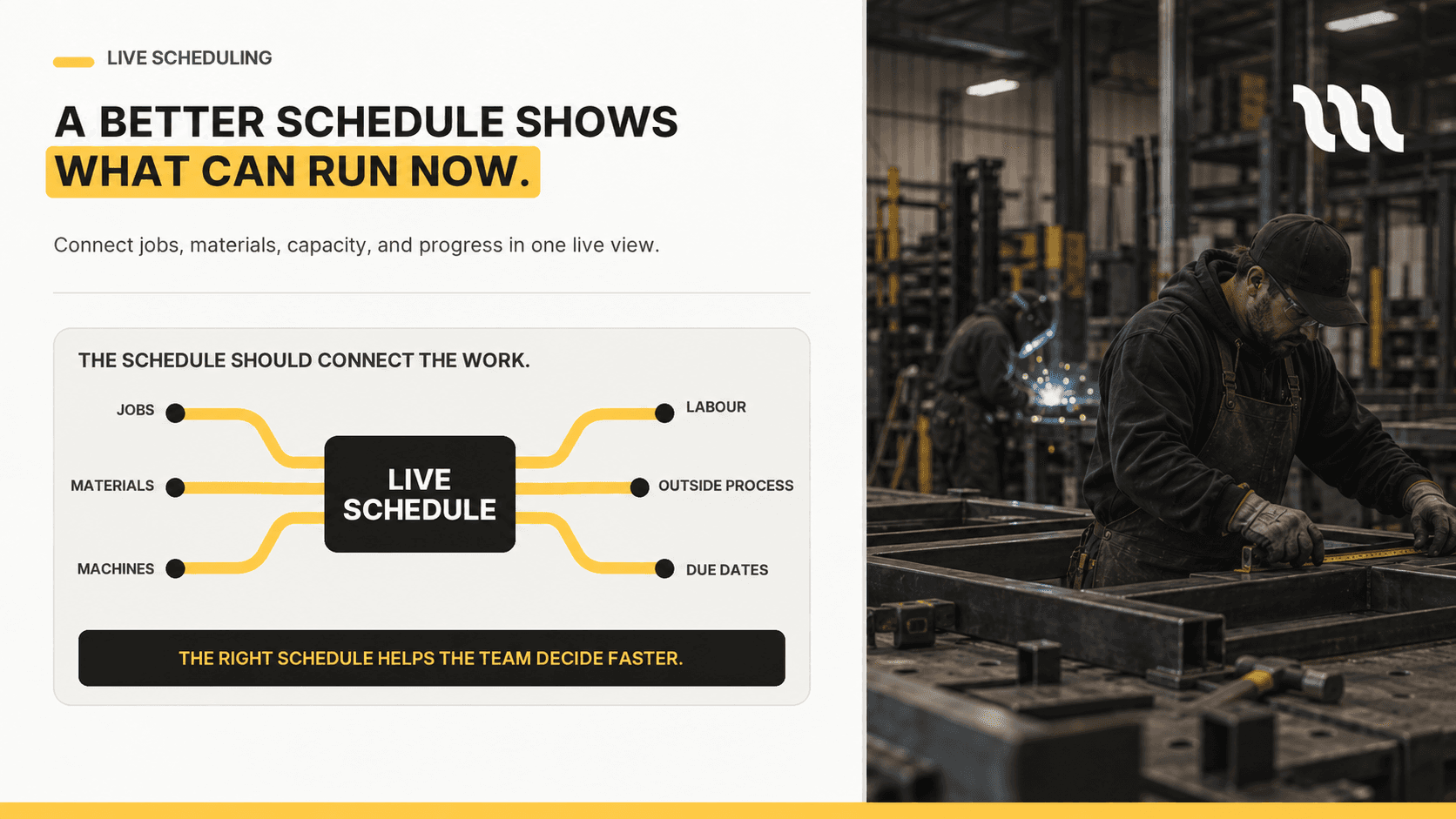
A useful live schedule connects the jobs in the pipeline to the resources needed to finish them: routing steps, due dates, material readiness, labour constraints, machine availability, outside processes, and actual job progress. It should help the production manager see what can realistically get done, what's at risk, and what happens when priorities shift.
This is where connected systems earn their keep. The Australian Government's Digital tools for business guidance notes that the right tools can help businesses streamline processes, allocate and track tasks, and reduce errors. For a job shop, that value only shows up when the schedule is connected to the rest of the work, not sitting off to the side as another isolated tool.
A live schedule earns its place by pulling together quotes, job cards, due dates, material readiness, routing, machine capacity, labour availability, outside processes, shop-floor updates, and job costing, all in one place instead of nine.
What production teams actually need
Production teams don't need more screens. They need a schedule that helps the shop make better calls during the day.
That means it should answer the questions people are already asking:
What should run next?
What's blocked?
Which jobs are at risk?
Which machine is overloaded?
Which job is waiting on material?
Which outside process is holding up delivery?
What happens if we accept a rush job?
Can we actually promise this delivery date?
Which jobs will hurt margin if they run late?
These are questions production managers already answer manually, all day, from memory. A better system should lighten that load, not replace their judgement.
Why this matters in Australia now
Australian manufacturers are under pressure to lift productivity while working around real workforce constraints. Ai Group’s Australian Industry Outlook for 2026 found that higher-skilled workforce shortages have barely eased, and that leaders are prioritising near-term productivity: strengthening processes, building workforce capability and investing in technology.
For fabrication shops, better scheduling is one of the most practical ways to lift output without immediately hiring more people or buying more machines. The goal isn't to make the shop more "digital" for its own sake. It's to cut wasted time, idle capacity, missed handovers, and last-minute firefighting.
Still running production from a whiteboard?
MirrorWorks gives fabrication teams the visibility of a whiteboard, connected to live jobs, materials, schedules and shop-floor updates.
Final thought
Whiteboards aren't the enemy. They're popular because they solve a real problem: visibility.
But a growing job shop needs more than visibility. It needs trust, live updates, capacity awareness, and a clear line between quoting, scheduling, production, and profitability.
The best replacement for a whiteboard isn't a complicated ERP screen. It's a live operating system that feels practical enough for the floor and powerful enough for production planning.
That's the standard manufacturing software needs to meet.
Whiteboards vs Live Schedules: What Production Teams Actually Need
At a glance
The fix isn't ripping out the whiteboard's logic. It's giving the shop that same visibility, connected to live job data.
Most production teams like their whiteboard for a good reason. Anyone can walk past and understand the plan, at least roughly. For a small fabrication shop, that simplicity is hard to beat.
The problem isn't the whiteboard. The problem is what happens when the whiteboard becomes the production system.
As the shop grows, the board has to carry too much: which jobs are due, which machines are free, which materials have landed, who's running what, what's changed since this morning, what's waiting on an outside process, and which customer is chasing an answer. That's more than a static board can hold reliably.
A whiteboard can show what the team planned. It can't maintain a live production schedule.
A whiteboard is useful because everyone can see it. It becomes dangerous when everyone assumes it's still accurate.
Why whiteboards survive in job shops
Whiteboards survive because they solve a real problem. Plenty of digital systems are too slow, too rigid, or too fiddly to use standing on the shop floor. When the production manager needs to make a quick call, the whiteboard is usually faster than the software.
That matters in high-mix, low-volume fabrication. Jobs change constantly. Material shows up late. Customers push priorities. Operators finish early or run over. Machines go down. Outside processes slip. A system that can't keep pace gets bypassed.
The software might handle reporting, quoting, purchasing, or invoicing, but the real production plan still lives on the wall.
That split creates a trust problem. If the whiteboard is the trusted schedule, the software isn't really the operating system. It's an after-the-fact record.
Why it keeps winning:
Everyone can see it
It's easy to update
It reflects the production manager's judgement
It works without training
It feels practical standing on the floor
Where it breaks down:
It isn't connected to live job data
Updates get missed or misread
It depends on one person maintaining it
It doesn't capture job history
It can't show profitability, capacity, or material readiness
The real issue is not paper versus software
It is tempting to frame this as “whiteboard bad, software good”. That is too simple.
The real question is whether the schedule is trusted.
If the whiteboard is more accurate than the system, the team will keep using the whiteboard. If the system is faster to update and easier to rely on, the team will use the system instead.
Manufacturing software fails when it underestimates that reality. A schedule that looks impressive in a demo is not useful if operators never update job status, if material readiness is missing or if the production manager ends up rebuilding the plan by hand anyway.
A live schedule needs to feel as practical as a whiteboard while doing things a whiteboard cannot. For more on why static plans break, read The Friday Afternoon Scheduling Problem.
Is the whiteboard doing too much?
A few questions worth asking:
Is the whiteboard more trusted than the software?
Does one person update the board by hand every day?
Do jobs start before materials are actually ready?
Are delivery dates promised before anyone checks real capacity?
Are changes communicated verbally after the board's already been updated?
Do you know why last week's schedule fell apart?
If more than a couple of these sound familiar, the whiteboard isn't the backup plan anymore. It's the plan.
What a live schedule should actually do
A live production schedule shouldn't just digitise the whiteboard. A digital whiteboard that still depends on manual updates is only a partial improvement.
A useful live schedule connects the jobs in the pipeline to the resources needed to finish them: routing steps, due dates, material readiness, labour constraints, machine availability, outside processes, and actual job progress. It should help the production manager see what can realistically get done, what's at risk, and what happens when priorities shift.
This is where connected systems earn their keep. The Australian Government's Digital tools for business guidance notes that the right tools can help businesses streamline processes, allocate and track tasks, and reduce errors. For a job shop, that value only shows up when the schedule is connected to the rest of the work, not sitting off to the side as another isolated tool.
A live schedule earns its place by pulling together quotes, job cards, due dates, material readiness, routing, machine capacity, labour availability, outside processes, shop-floor updates, and job costing, all in one place instead of nine.
What production teams actually need
Production teams don't need more screens. They need a schedule that helps the shop make better calls during the day.
That means it should answer the questions people are already asking:
What should run next?
What's blocked?
Which jobs are at risk?
Which machine is overloaded?
Which job is waiting on material?
Which outside process is holding up delivery?
What happens if we accept a rush job?
Can we actually promise this delivery date?
Which jobs will hurt margin if they run late?
These are questions production managers already answer manually, all day, from memory. A better system should lighten that load, not replace their judgement.
Why this matters in Australia now
Australian manufacturers are under pressure to lift productivity while working around real workforce constraints. Ai Group’s Australian Industry Outlook for 2026 found that higher-skilled workforce shortages have barely eased, and that leaders are prioritising near-term productivity: strengthening processes, building workforce capability and investing in technology.
For fabrication shops, better scheduling is one of the most practical ways to lift output without immediately hiring more people or buying more machines. The goal isn't to make the shop more "digital" for its own sake. It's to cut wasted time, idle capacity, missed handovers, and last-minute firefighting.
Still running production from a whiteboard?
MirrorWorks gives fabrication teams the visibility of a whiteboard, connected to live jobs, materials, schedules and shop-floor updates.
Final thought
Whiteboards aren't the enemy. They're popular because they solve a real problem: visibility.
But a growing job shop needs more than visibility. It needs trust, live updates, capacity awareness, and a clear line between quoting, scheduling, production, and profitability.
The best replacement for a whiteboard isn't a complicated ERP screen. It's a live operating system that feels practical enough for the floor and powerful enough for production planning.
That's the standard manufacturing software needs to meet.
Start waitlist
Still running jobs through spreadsheets, whiteboards, and memory?
Still running jobs through spreadsheets, whiteboards, and memory?
Still running jobs through spreadsheets, whiteboards, and memory?
MirrorWorks connects quoting, scheduling, production, and job profitability in one simple system for fabrication teams.
MirrorWorks connects quoting, scheduling, production, and job profitability in one simple system for fabrication teams.

Operations
Operations
How to Move Off Spreadsheets Without Stopping the Shop
How to Move Off Spreadsheets Without Stopping the Shop
How to Move Off Spreadsheets Without Stopping the Shop

Operations
Operations
Purchase Orders That Match the Job, Not the Guess
Purchase Orders That Match the Job, Not the Guess
Purchase Orders That Match the Job, Not the Guess

Operations
Operations
Stop Typing Jobs Twice: One Record From Quote to Invoice
Stop Typing Jobs Twice: One Record From Quote to Invoice
Stop Typing Jobs Twice: One Record From Quote to Invoice

Quoting
Quoting
How to Price Welding per Metre Without Guessing
How to Price Welding per Metre Without Guessing
How to Price Welding per Metre Without Guessing
Frequently asked questions
Frequently asked questions
Frequently asked questions
Get clear answers about MirrorWorks and how it works for fabrication teams.
Get clear answers about MirrorWorks and how it works for fabrication teams.
How long does implementation take?
Is MirrorWorks built for custom fabrication work?
Can we move from spreadsheets gradually?
Can I see MirrorWorks in action?