
Operations
Operations
Stop Typing Jobs Twice: One Record From Quote to Invoice
Stop Typing Jobs Twice: One Record From Quote to Invoice
Stop Typing Jobs Twice: One Record From Quote to Invoice

By
By
By
Matthew Quigley
Matthew Quigley
Matthew Quigley
All field notes
All field notes

At a glance
In many small shops, the same job gets typed three or four times: into the quote, the job sheet, the purchase order and the invoice.
Every retype is a chance to drop a line, miss a variation or bill the wrong quantity.
The fix is not working faster. It is one record that carries the job from quote to invoice.
Use the audit below to count how many times your shop retypes a job this week.
MirrorWorks is built around one job record from quote to invoice.
Follow one job through your shop
Pick a job you finished last month. Now trace it.
The estimator builds a quote in a spreadsheet or a quoting template.
The customer says yes by email. Someone writes a job sheet, or adds a row to the job list.
Someone orders steel and consumables, typing the material list into an email or supplier form.
The floor works from a printout or the whiteboard.
The job finishes. Someone types an invoice into the accounting software, working from the quote and whatever changed on the floor.
Count the times the same information was entered by hand. In many shops it is four or five.
Each one feels small. Together they add up to hours every week, and a steady trickle of mistakes.
Where the mistakes come from

Retyping does not just cost time. It is where errors get in.
Retype point | What goes wrong |
|---|---|
Quote to job sheet | A line item gets left off, so the floor does not know it is needed |
Job sheet to purchase order | The wrong thickness or quantity gets ordered |
Floor changes to invoice | An extra hour of welding or a variation never gets billed |
Quote to invoice | The invoice is built from the original quote, not the final job |
The last two are the expensive ones. Work you did and did not bill is pure margin lost. We cover how variations go missing in our post on pricing change orders mid-job.
Why "be more careful" does not work
When a mistake costs money, the usual response is a new rule. Double-check the invoice. Cross-check the PO. Initial the job sheet.
These help a little, but they add more steps to a process that already has too many. The person checking is usually the owner, at night, after quoting.
The root problem is structural. If the same job lives in four places, those four places will drift apart. No amount of care stops that for long.
The one-record idea
The alternative is simple to describe: one record for the job, from the first quote to the final invoice.
The quote becomes the order when the customer says yes. Nobody retypes it.
The order puts the job on the job board.
The material list on the job becomes the purchase order.
The floor sees the job and what is next.
When the job is done, the invoice is raised from the same record, including what changed.
Each step adds to the record. Nothing is copied by hand.
This is not a new idea. Traditional ERPs have done it for decades. The problem for a small shop is that they come with everything else attached. See why manufacturing ERPs fail small job shops for why that tends to go badly.
Audit your own retyping this week
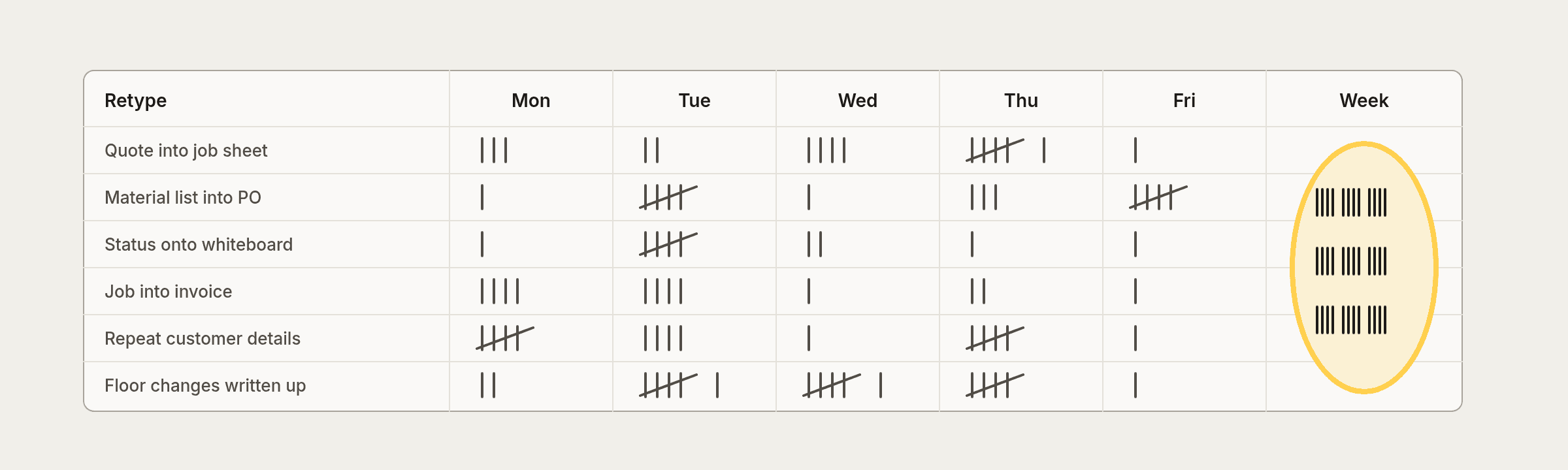
Run this for five working days. Tally each time someone types information that already exists somewhere else.
☐ Quote details copied into a job sheet or job list
☐ Material lists copied into a purchase order or supplier email
☐ Job status copied onto a whiteboard
☐ Job details copied into an invoice
☐ Customer details typed in again for a repeat customer
☐ Changes on the floor passed on by phone or text and written up later
Then ask two questions:
Who did the retyping, and what would they have done with that time instead?
How many of those retypes had a mistake you caught? How many might you not have caught?
If the owner is doing most of it, that is time not spent quoting. Our post on how job shops can reduce admin work without hiring more admin covers where else that time leaks.
What retyping does to the owner's week
In a shop of one to three people, the retyping usually lands on one person. Often it is the owner, and often it happens after hours.
That has a cost beyond the hours themselves:
Quotes slow down. Time spent copying a finished job into an invoice is time not spent pricing the next one. Slow quotes lose work, as we cover in why slow quotes cost fabricators good jobs.
Invoices go out late. If invoicing waits for a quiet evening, cash waits too.
Nobody else can do it. When the process lives in one person's routine, a week off means a backlog.
None of that shows up as a line on a report. It shows up as a tired owner and a pile of paperwork on Friday.
An illustrative example
These numbers are made up to show the pattern, not taken from a real shop.
A job is quoted with six lines. On the floor, the customer asks for an extra cleat and two more holes. The leading hand texts the owner. Two weeks later the owner builds the invoice from the original quote, because that is the document in front of them. The text is buried in their phone. The extra work goes unbilled.
With one record, the change is added to the job when it happens, and the invoice is raised from the job. The extra work is on it because it never left the record.
What you can fix without new software
You do not need a new system to cut some of the retyping.
Use one job number everywhere. Quote, job sheet, PO and invoice all carry it. Searching gets easier and things stop getting lost.
Build quotes in a structure you can reuse. If the job sheet is a copy of the quote layout, the transfer is faster and less error prone.
Record variations when they happen. A two-line note on the job at the time beats trying to remember at invoice time.
Invoice from the job, not the quote. Make it a rule that the invoice is checked against what was actually done.
These are worth doing regardless. They also make any later move to software much easier, because your data already has a shape.
Where MirrorWorks comes in
MirrorWorks is built around the one-record idea.
Quote. Build it once, from the job you actually do.
Order. Win it and the quote becomes the order.
Job board. Every open job in one place.
Floor screen. Who is on what, and what is next, by the roller door.
Purchase order. Buy what the job needs without rewriting the list.
Invoice. Raise it from the same record. Invoices into Xero are coming.
Know your numbers first
The other half of getting invoices right is knowing what the work actually costs. If welding hours or sheet usage are guesses on the quote, they will be guesses on the invoice too.
Final thought
If your shop types the same job three or four times before it gets paid, you are not careless. You are working with a setup that makes mistakes likely.
MirrorWorks connects quoting, jobs, buying and invoicing in one record for fabrication teams. If you want to see how that would work in your shop, contact the team.
At a glance
In many small shops, the same job gets typed three or four times: into the quote, the job sheet, the purchase order and the invoice.
Every retype is a chance to drop a line, miss a variation or bill the wrong quantity.
The fix is not working faster. It is one record that carries the job from quote to invoice.
Use the audit below to count how many times your shop retypes a job this week.
MirrorWorks is built around one job record from quote to invoice.
Follow one job through your shop
Pick a job you finished last month. Now trace it.
The estimator builds a quote in a spreadsheet or a quoting template.
The customer says yes by email. Someone writes a job sheet, or adds a row to the job list.
Someone orders steel and consumables, typing the material list into an email or supplier form.
The floor works from a printout or the whiteboard.
The job finishes. Someone types an invoice into the accounting software, working from the quote and whatever changed on the floor.
Count the times the same information was entered by hand. In many shops it is four or five.
Each one feels small. Together they add up to hours every week, and a steady trickle of mistakes.
Where the mistakes come from
Retyping does not just cost time. It is where errors get in.
Retype point | What goes wrong |
|---|---|
Quote to job sheet | A line item gets left off, so the floor does not know it is needed |
Job sheet to purchase order | The wrong thickness or quantity gets ordered |
Floor changes to invoice | An extra hour of welding or a variation never gets billed |
Quote to invoice | The invoice is built from the original quote, not the final job |
The last two are the expensive ones. Work you did and did not bill is pure margin lost. We cover how variations go missing in our post on pricing change orders mid-job.
Why "be more careful" does not work
When a mistake costs money, the usual response is a new rule. Double-check the invoice. Cross-check the PO. Initial the job sheet.
These help a little, but they add more steps to a process that already has too many. The person checking is usually the owner, at night, after quoting.
The root problem is structural. If the same job lives in four places, those four places will drift apart. No amount of care stops that for long.
The one-record idea
The alternative is simple to describe: one record for the job, from the first quote to the final invoice.
The quote becomes the order when the customer says yes. Nobody retypes it.
The order puts the job on the job board.
The material list on the job becomes the purchase order.
The floor sees the job and what is next.
When the job is done, the invoice is raised from the same record, including what changed.
Each step adds to the record. Nothing is copied by hand.
This is not a new idea. Traditional ERPs have done it for decades. The problem for a small shop is that they come with everything else attached. See why manufacturing ERPs fail small job shops for why that tends to go badly.
Audit your own retyping this week
Run this for five working days. Tally each time someone types information that already exists somewhere else.
☐ Quote details copied into a job sheet or job list
☐ Material lists copied into a purchase order or supplier email
☐ Job status copied onto a whiteboard
☐ Job details copied into an invoice
☐ Customer details typed in again for a repeat customer
☐ Changes on the floor passed on by phone or text and written up later
Then ask two questions:
Who did the retyping, and what would they have done with that time instead?
How many of those retypes had a mistake you caught? How many might you not have caught?
If the owner is doing most of it, that is time not spent quoting. Our post on how job shops can reduce admin work without hiring more admin covers where else that time leaks.
What retyping does to the owner's week
In a shop of one to three people, the retyping usually lands on one person. Often it is the owner, and often it happens after hours.
That has a cost beyond the hours themselves:
Quotes slow down. Time spent copying a finished job into an invoice is time not spent pricing the next one. Slow quotes lose work, as we cover in why slow quotes cost fabricators good jobs.
Invoices go out late. If invoicing waits for a quiet evening, cash waits too.
Nobody else can do it. When the process lives in one person's routine, a week off means a backlog.
None of that shows up as a line on a report. It shows up as a tired owner and a pile of paperwork on Friday.
An illustrative example
These numbers are made up to show the pattern, not taken from a real shop.
A job is quoted with six lines. On the floor, the customer asks for an extra cleat and two more holes. The leading hand texts the owner. Two weeks later the owner builds the invoice from the original quote, because that is the document in front of them. The text is buried in their phone. The extra work goes unbilled.
With one record, the change is added to the job when it happens, and the invoice is raised from the job. The extra work is on it because it never left the record.
What you can fix without new software
You do not need a new system to cut some of the retyping.
Use one job number everywhere. Quote, job sheet, PO and invoice all carry it. Searching gets easier and things stop getting lost.
Build quotes in a structure you can reuse. If the job sheet is a copy of the quote layout, the transfer is faster and less error prone.
Record variations when they happen. A two-line note on the job at the time beats trying to remember at invoice time.
Invoice from the job, not the quote. Make it a rule that the invoice is checked against what was actually done.
These are worth doing regardless. They also make any later move to software much easier, because your data already has a shape.
Where MirrorWorks comes in
MirrorWorks is built around the one-record idea.
Quote. Build it once, from the job you actually do.
Order. Win it and the quote becomes the order.
Job board. Every open job in one place.
Floor screen. Who is on what, and what is next, by the roller door.
Purchase order. Buy what the job needs without rewriting the list.
Invoice. Raise it from the same record. Invoices into Xero are coming.
Know your numbers first
The other half of getting invoices right is knowing what the work actually costs. If welding hours or sheet usage are guesses on the quote, they will be guesses on the invoice too.
Final thought
If your shop types the same job three or four times before it gets paid, you are not careless. You are working with a setup that makes mistakes likely.
MirrorWorks connects quoting, jobs, buying and invoicing in one record for fabrication teams. If you want to see how that would work in your shop, contact the team.
Start waitlist
Still running jobs through spreadsheets, whiteboards, and memory?
Still running jobs through spreadsheets, whiteboards, and memory?
Still running jobs through spreadsheets, whiteboards, and memory?
MirrorWorks connects quoting, scheduling, production, and job profitability in one simple system for fabrication teams.
MirrorWorks connects quoting, scheduling, production, and job profitability in one simple system for fabrication teams.

Operations
Operations
How to Move Off Spreadsheets Without Stopping the Shop
How to Move Off Spreadsheets Without Stopping the Shop
How to Move Off Spreadsheets Without Stopping the Shop

Operations
Operations
Purchase Orders That Match the Job, Not the Guess
Purchase Orders That Match the Job, Not the Guess
Purchase Orders That Match the Job, Not the Guess
Operations
Operations
Stop Typing Jobs Twice: One Record From Quote to Invoice
Stop Typing Jobs Twice: One Record From Quote to Invoice
Stop Typing Jobs Twice: One Record From Quote to Invoice

Quoting
Quoting
How to Price Welding per Metre Without Guessing
How to Price Welding per Metre Without Guessing
How to Price Welding per Metre Without Guessing
Frequently asked questions
Frequently asked questions
Frequently asked questions
Get clear answers about MirrorWorks and how it works for fabrication teams.
Get clear answers about MirrorWorks and how it works for fabrication teams.
How long does implementation take?
Is MirrorWorks built for custom fabrication work?
Can we move from spreadsheets gradually?
Can I see MirrorWorks in action?